Microsoft 365 Email Signature Management in Oman
⏱ 7 min read · ~1,500 words ✍ EMAR Digital Solutions
Each business email shows your brand. People quickly notice the sender’s name, role, company logo, contact details, and the overall look.
A polished signature strengthens credibility, while an old or inconsistent one can make the business appear disorganized.
Microsoft 365 email signature management helps companies standardize and control signatures across employees, teams, offices, brands, and mobile devices.
Rather than relying on every user to edit signatures individually, organizations handle updates through a centralized system.
EMAR Digital Solutions delivers end-to-end email signature management services in Oman with CodeTwo Email Signatures 365.
As a Microsoft and CodeTwo partner, we help with consulting and licensing. We also create signatures and integrate Microsoft 365. We support rollout, testing, and user training.
What Is a Microsoft 365 Email Signature?
A Microsoft 365 email signature is a section added at the end of an email.
Outlook, Exchange Online, or another connected email client adds it.
It works like a digital business card and helps recipients identify the sender fast.
A standard signature section may contain:
- Employee name and job title
- Company name and company logo
- Telephone number and email address
- Website and office address
- Social media links
- Certifications or partner information
- Legal disclaimers
- Promotional banners
- A call-to-action
A professional business email signature should be clear, easy to read, and match the company brand. It should display well on desktops, browsers, tablets, and mobile devices.
The challenge is not creating one signature. It ensures every Microsoft 365 email signature stays correct, unified, and consistent throughout the entire company.
Why Manual Email Signatures Become a Business Problem?
Manual signatures may work for a company with two or three users. However, the process becomes harder as the organization grows.
One employee may use an old logo. Someone else might enter the wrong phone number.. A new user may copy a colleague’s template and forget the job title. Staff may also use different fonts, colors, image sizes, or social icons.
The issue grows when employees use multiple devices. A signature in classic Outlook may differ from new Outlook. It may also differ in Outlook on the web. It can vary in mobile applications or in Apple Mail.
A free email signature generator can help one person create a professional email signature. However, it does not support company-wide control. It cannot ensure every employee uses the approved design, correct contact details, or required disclaimer.
Manual updates also increase IT’s workload.
When a company changes its website, address, logo, or campaign banner, admins must send instructions.
They must also follow up with users.

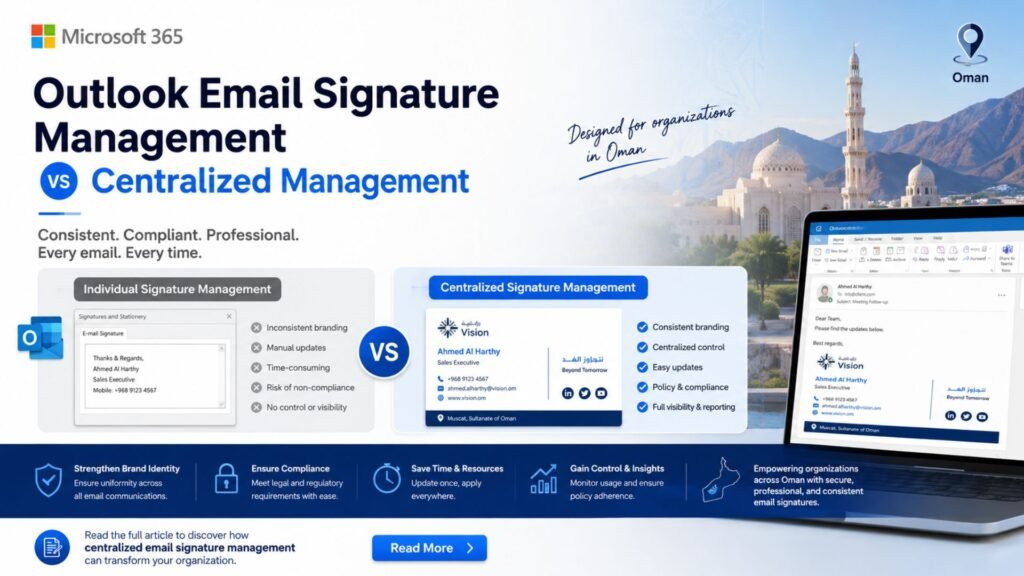
Outlook Email Signature Management vs Centralized Management
Outlook lets users make signature templates for new emails, replies, and forwards.
These templates can include text, links, images, and a company logo.
However, Outlook email signature management is mostly user-controlled. Each employee can edit, remove, or change the signature. As a result, IT and marketing cannot easily enforce a single approved format.
Microsoft 365 administrators can use Exchange Online mail flow rules to add signatures or disclaimers for the whole organization. This method works well for basic legal text or a simple company-wide footer.
Even so, built-in rules come with clear constraints.
A server-side signature may not appear under the newest reply or forwarded message.
However, you may also not find it listed in the Sent Items folder.
Image handling is also limited. Missing directory values can affect the final layout.
A centralized Microsoft 365 email signature solution gives better control. Administrators can manage templates, directory data, rules, disclaimers, and campaigns in one place.
How to Centrally Manage Email Signatures in Microsoft 365
The process should begin with a review of users, departments, domains, mailboxes, and brand requirements.
A successful implementation normally includes:
- Review the Microsoft 365 tenant and licensed users.
- Identify departments, offices, brands, and shared mailboxes.
- Check Microsoft Entra ID user information.
- Define required signatures, banners, and disclaimers.
- Design signature templates that work well on any screen.
- Establish guidelines for users, teams, and message categories.
- Review the settings across desktop, web, and mobile devices to ensure consistent performance.
- Launch a pilot program with a chosen group of users.
- Deploy the approved solution company wide.
- Train administrators and provide support.
The directory review is important. If a user’s phone number, department, office, or job title is missing, the signature may display incomplete information. Clean Microsoft Entra ID data creates better results and reduces manual corrections.
What Is CodeTwo Email Signatures 365?
CodeTwo Email Signatures 365 is a cloud-based platform. It manages email signatures, legal disclaimers, banners, and branding in Microsoft 365.
It uses rules to choose which signature to use, who to send it to, and when to show it. Organizations can create one company-wide template or different templates for departments, offices, brands, and job roles.
CodeTwo offers cloud, Outlook, and hybrid signature options.
In cloud mode, the system adds the signature after sending the email.
In Outlook mode, users see the signature while writing the email.
Combo mode uses both methods, based on the email client and device.
This flexibility helps organizations maintain consistent 365 email signature formatting across different working environments.
Main Benefits of CodeTwo Email Signatures 365
Central Control
Administrators manage email signatures from one place. Employees do not need to configure templates or follow manual update instructions.
When branding or contact details change, you can update the central template once. This reduces errors and keeps messages aligned with company standards.
Dynamic User Information
CodeTwo can use Microsoft Entra ID attributes to add details automatically.
These include names, job titles, departments, office locations, phone numbers, and email addresses.
When HR updates an employee’s directory information, the new details can appear without redesigning the template.
Department and Branch Rules
Different teams often need different content. Sales may use a promotional banner. Finance may require a formal disclaimer. Customer support may display a service number, while management may prefer a compact design.
Rules can support branches in Muscat, Sohar, Salalah, or Duqm. They show the correct office and contact details for each sender.
Consistency Across Devices
Central management reduces differences between Outlook desktop, Outlook on the web, Mac, smartphones, tablets, and other connected email clients.
This helps remote and travelling employees maintain a professional image when switching devices.
Legal Disclaimers
Organizations can use approved legal text without relying on employees.
Departments, domains, regions, recipient types, or external messages can determine different disclaimers.
Marketing Banners
Employee email can become a useful marketing channel. A banner may promote a service, event, exhibition, survey, product launch, recruitment campaign, or seasonal offer.
Marketing teams can update banners in one place. They can send recipients to a landing page, quote form, company profile, or contact page.
Delegated Management
IT can manage the technical configuration while authorized marketing staff manage approved banners and brand content. This supports faster updates without giving unnecessary Microsoft 365 administrative access.
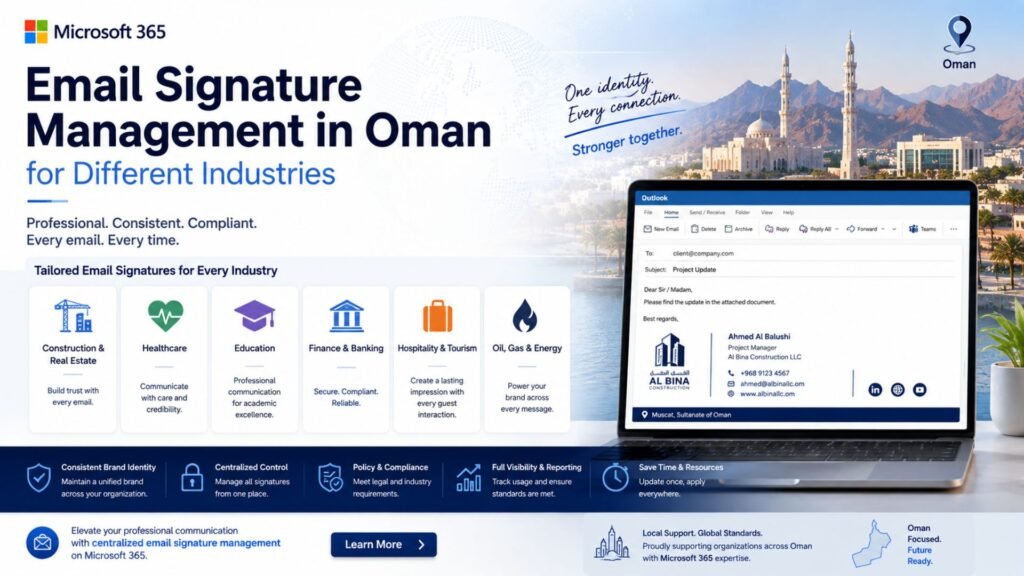
Email Signature Management in Oman for Different Industries
The same signature strategy does not suit every organization. Design and rules should reflect the industry and communication needs.
A real estate company may include campaign banners and links to listings. A construction company may show certification details and division contacts.
A hotel can promote seasonal packages. A technology company may show partner status and service links.
Professional services Firms may require confidentiality disclaimers.. Retail companies can promote offers. Organizations communicating locally and internationally may need Arabic, English, or bilingual signature templates.
For Omani businesses, useful elements may include:
- Oman telephone and mobile numbers
- WhatsApp contact buttons
- English and Arabic information
- Branch or office locations
- Commercial registration details
- Website and social media links
- Partner or certification information
- Campaign banners and legal disclaimers
The design should remain clean. Too many icons, large images, or several promotional messages can make the signature crowded and reduce readability.
Why Professional Implementation Matters
Buying a license is only one part of the project. You must also configure, test, and maintain the platform correctly.
Poor planning can cause wrong user data, duplicate signatures, bad rules, missing disclaimers, large images, or uneven formatting. Shared mailboxes and send-on-behalf use also need careful testing.
A professional implementation aligns IT, marketing, HR, and management. IT controls the environment. Marketing approves the design. HR confirms employee data. Management approves corporate and legal content.
This creates a reliable system instead of another tool that employees and administrators must troubleshoot.

CodeTwo Services from EMAR Digital Solutions
EMAR Digital Solutions provides end-to-end Microsoft 365 email signature management services in Oman. Our role goes beyond selling CodeTwo licenses. We deliver a configured and tested solution based on your organization needs.
Our services include:
- Microsoft 365 environment assessment
- CodeTwo licensing assistance
- User and mailbox scope planning
- Microsoft Entra ID data review
- Professional email signature design
- Department and branch templates
- English, Arabic, or bilingual signatures
- Legal disclaimer configuration
- Marketing banner design and deployment
- Shared mailbox planning
- Rule creation and testing
- Pilot deployment and company-wide rollout
- Administrator training
- Technical support and future updates
We review users, domains, departments, offices, shared mailboxes, and required templates before preparing the design and configuration plan.
After approval, our team connects CodeTwo to Microsoft 365. We set up the chosen signature mode. We create rules and test the results.
We review new messages, responses, and forwarded emails.
We also check internal and external emails. We test mobile use and common Outlook environments.
Following the pilot, we deploy the solution and train the administrator in charge. We also support new employees and branches. We can also help with branding, disclaimers, and campaign banners.
Frequently Asked Questions
Can Microsoft 365 Manage Signatures Without Third-Party Software?
Yes. Outlook supports signatures you create. Exchange Online rules can add company-wide disclaimers or footer text. Native options have limits for central control, reply placement, preview, images, targeting, and campaigns.
Can Every Department Have a Different Signature?
Yes. CodeTwo rules can assign templates based on users, groups, departments, offices, domains, and directory information.
Can Users See the Signature Before Sending?
In Outlook signature mode, users can view the signature while composing. The exact behavior depends on the deployment method and email client.
Does It Work on Mobile Devices?
CodeTwo can add signatures to emails sent from mobile devices.
Cloud, Outlook, or combo mode controls how the system adds the signature.
Can EMAR Design and Set Up Everything?
Yes. EMAR Digital Solutions offers consulting, licensing help, signature design, Microsoft 365 integration, rule setup, testing, deployment, training, and ongoing support.
Ready to Move Your Business Files to the Cloud?
Explore Related Services & Solutions
Ready to Upgrade Your Business and get price?
Transform the way your team works with Microsoft 365 Business solutions.
Contact Us Today
📞 +968 99 466 123
📧 sales@omandigital.solutions